How to Build a Self-Service IT Portal That Reduces Ticket Volume
Most enterprise self-service IT portals do not reduce ticket volume. The portal goes live, an announcement goes out, and three months later the IT team is still receiving the same volume of direct emails and phone calls it was before. The portal exists. Business users are not using it.
The reason is almost never the platform. Jira Service Management's self-service portal is capable of deflecting a meaningful portion of inbound ticket volume. The reason is design. Portals built around IT's internal organisation, labelled with IT terminology, and backed by a knowledge base populated with technical documentation for engineers are portals that business users cannot navigate. They bypass the portal not because they are uncooperative but because it is faster to send an email.
This guide covers how to design and configure a self-service portal in Jira Service Management that users will actually use: from service catalogue design to Confluence knowledge base structure to deflection metrics. For the broader ITSM framework that governs portal design, see the Enterprise ITSM guide.
Why Most Self-Service Portals Do Not Work
Before covering the build, it is worth being precise about what fails, and why. Three design failures account for most of the gap between a portal that exists and a portal that deflects tickets.
Built for IT Admins, Not for End Users
The most common failure is designing the portal for the people who built it rather than for the people who use it. Request types carry IT labels: "Incident Report Form", "Change Request Submission", "CMDB Update". Portal categories reflect the IT department's internal structure: Applications Team, Infrastructure Team, Security Team. None of those labels mean anything to a business user who needs a password reset or a new software licence.
The test is straightforward. A user types "printer not working" into the portal search. If the results are zero or irrelevant, the portal is not designed for that user. They will send an email instead. That email becomes a ticket that an agent routes manually, at a higher handling cost and longer resolution time than a self-service completion would have required.
Category structure should follow user intent, not team structure. "Something is broken" (incidents) and "I need something" (service requests) are the two dominant categories. Within each, specific request types use the language the user would type, not the label the IT team assigned internally.
The Knowledge Base Is Treated as an Afterthought
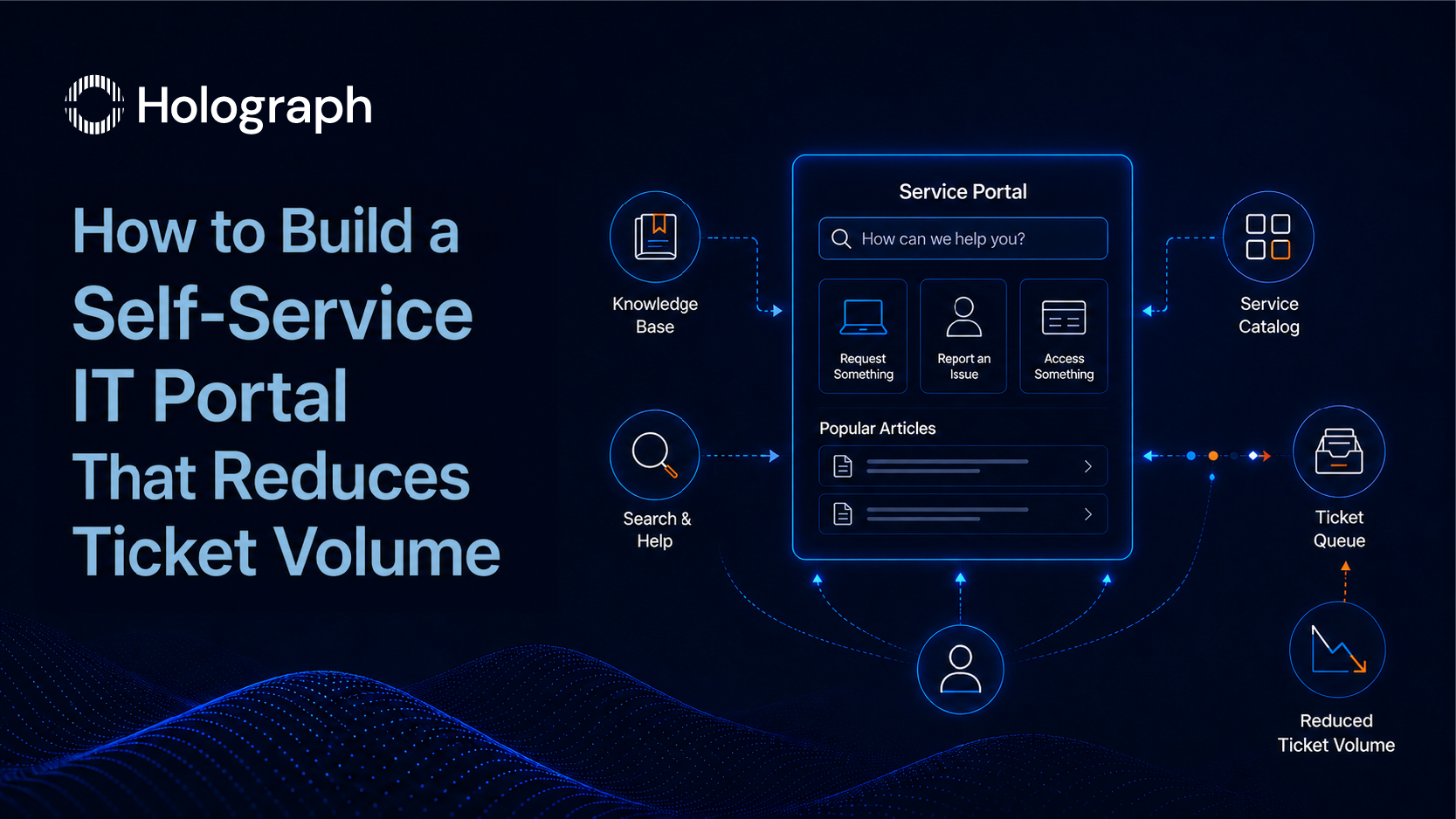
A Jira Service Management portal surfacing Confluence articles before a user reaches a request form is the deflection mechanism. It requires two conditions: the Confluence space is linked to the portal, and articles exist before go-live.
Most enterprise implementations treat the knowledge base as a post-go-live task. The portal launches. The team plans to write articles once the queue settles. The queue does not settle because there is no knowledge layer to deflect routine requests. The articles get written six months later, for the ticket types the team is tired of resolving manually, in the technical language the IT engineers use internally. Business users still cannot find what they need.
Knowledge base articles written before go-live, in user language, for the 20 most common ticket types, will deflect more requests in the first 90 days than any other single configuration decision.
No Measurement From Week One
A portal that goes live without a baseline is a portal that cannot prove its value. Without ticket volume data from before launch, there is no way to quantify what the portal is deflecting. Without tracking which request types generate the most portal completions versus submitted tickets, there is no basis for knowing where to invest the next improvement cycle.
The measurement framework is simple. Set it up before the portal launches. The data it generates in the first 30 days will direct every portal optimisation decision for the following 60 days.
Start With the Service Catalogue Before Opening JSM
What a Service Catalogue Is and Why It Comes First
A service catalogue is the agreed, documented list of services that IT delivers to the business. In ITIL 4 terms, it is the mechanism that connects what IT produces to what the business requires. For portal design purposes, the service catalogue answers a specific question before any JSM configuration begins: what will users be able to request, and how will those requests be named?
The catalogue has two layers. Business services are what the user experiences: password reset, software access request, new device setup, onboarding task. Technical services are what IT operates to deliver those business services. The portal surfaces the business services layer. End users never see the technical services layer. It exists for IT's operational management.
Configuring the portal before the service catalogue is defined produces a portal structured around IT's internal organisation rather than around how users think about their problems. For the ITIL 4 framework that governs service catalogue design, see How to Implement ITIL 4 with Jira Service Management.
How to Structure Request Types for Real User Behaviour
Group request types by what the user is trying to do, not by which IT team owns the resolution. Four top-level categories cover the majority of enterprise request volume: "Get something" (new access, new hardware, new software), "Fix something" (incidents where a service has broken), "Change something" (modifications to an existing configuration or access level), and "Request access" (permissions changes, role additions, account adjustments).
Within each category, request type names use the language the user would search for, not the label from the IT service desk taxonomy. "Laptop not connecting to VPN" works better than "Network Connectivity Incident". Both describe the same request. One is written for the user typing into a search box.
Limit the number of request types visible on the portal front page. More than eight to ten options on the first screen causes decision paralysis. Surface the five most common request types directly. Let search handle the rest.
What Information to Capture and What to Leave Out
Every field on a request form is friction. Friction reduces form completion rates. The test: can a non-technical user complete the form in under three minutes? If not, the form is requesting information that IT wants to have but does not need to route the request.
Capture only the fields that determine routing and priority. Request type, brief description, and urgency indication covers the routing decision for most request types. Attachments are useful. Mandatory free-text fields with no guidance are not. If the IT team needs additional information to fulfil a request, the agent can request it after the ticket is created. The goal at submission is completion, not comprehensiveness.
Building the Knowledge Base in Confluence
The Relationship Between Confluence and Jira Service Management
JSM's self-service portal surfaces Confluence articles as suggested resolutions before a user submits a ticket. When a user types a query into the portal search, relevant Confluence knowledge base articles appear. If the user finds the answer in an article, the ticket is never submitted. That is the deflection event.
For this to work, a Confluence space must be linked to the JSM portal before go-live. When that link is in place, portal searches pull from the Confluence knowledge base. When it is not, the portal has no knowledge layer. It is a form collection. Users submit tickets for issues that documented articles could have resolved in two minutes.
The linkage is a configuration decision, not a technical integration challenge. It takes minutes to configure once the Confluence space exists. The prerequisite is the Confluence space and the articles, both of which require time to build correctly before the portal launches.
Writing Knowledge Base Articles Users Will Actually Read
The article title must match what the user types in the search box, not what IT calls the procedure internally. "How to reset your password" is findable. "Self-Service Password Reset Procedure v2.1" is not, at least not by the user searching for it at the moment their access is locked.
Article structure follows a consistent pattern: one-sentence answer at the top, numbered steps below, screenshots where each step involves a non-obvious interface action. Write for the least technical user who will encounter this problem. Assume no familiarity with IT systems. Every instruction should be completable by someone who has never performed this task before.
Article length: 300 to 600 words is the productive range. Articles shorter than 300 words often lack sufficient step detail. Articles longer than 600 words lose most users before the end. If a procedure requires more than 600 words to document completely, consider whether it should be a self-service procedure or a request type with agent fulfilment.
Mark every article for review on a 90-day cycle. Outdated articles where the screenshots no longer match the current interface, or where steps have changed due to a system update, damage user trust in the knowledge base as a whole. A user who follows an article to a dead end will not use the portal next time.
Measuring Article Effectiveness
Confluence provides feedback mechanisms at the article level. The thumbs-up or thumbs-down rating attached to each article gives a direct signal of whether users found the content useful. An article with a rating below 60% positive needs rewriting before the problem compounds.
Track ticket deflection per article: how many users viewed an article and did not submit a ticket afterward? This is the data that demonstrates the portal's operational value. An article that generates 200 views and 40 subsequent ticket submissions is performing at 80% deflection for that request type. An article that generates 200 views and 180 subsequent submissions has a content problem.
Search terms with zero results in the portal search log are articles that have not been written yet. Review this list every 30 days. Each zero-result search is a user who sent an email instead. For AI-assisted article suggestions and knowledge management in Jira, see also Rovo Agents for ITSM.
Configuring the Portal in Jira Service Management
Portal Branding and Navigation
The portal name and description are the first things a business user sees. Both should use user-facing language, not the IT department's name. "IT Help Portal" works. "IT Service Desk Ticketing System" tells the user they are about to submit a ticket, not solve a problem.
Featured items on the portal front page should reflect the five most common request types by volume. These change over time. Review the featured items at the 90-day mark and update based on actual request data, not on what the IT team assumed would be popular at launch.
Confirm that the portal search is pulling from the linked Confluence space before go-live. The test: type the five most common request types into the portal search and verify that relevant Confluence articles appear as suggestions. If they do not appear, the Confluence space linkage needs review.
Queue Management for the IT Team
Incidents and service requests require separate queues. Incidents need urgent triage and escalation logic. Service requests follow a predictable fulfilment path with no escalation requirement. A single shared queue averages the two into a metric that is not meaningful for either request type and makes it impossible to identify where performance problems originate.
SLA timers in JSM begin at ticket creation, not at assignment. Configure SLA timers accordingly. An unassigned ticket is still accumulating SLA time. Auto-assignment rules that route tickets to the correct team or individual immediately on creation prevent the timer running against an unattended queue.
Agent visibility should be restricted to the queues relevant to each team. An agent who can see all queues will pick the most familiar or fastest-to-resolve tickets from across the entire pool. That is not queue management. It is agent-directed routing, which undermines the priority logic built into the SLA configuration.
Testing the Suggestion Engine Before Go-Live
JSM's portal search surfaces Confluence articles as suggestions when a user types a query. The suggestion engine operates on keyword matching between the user's search terms and the content of Confluence articles. Article titles carry the highest weight.
Before the portal launches, run a go-live test. Take the 10 most common ticket types from the previous quarter's request data. Type each one into the portal search as a user would type it. Verify that a relevant Confluence article appears in the suggestions before the user reaches the request form. If it does not, either the article does not exist or the article title does not match the user's search language. Fix both before launch.
A portal that passes this test for the 10 most common request types will deflect a meaningful portion of those request types from day one. A portal that fails this test for more than two or three of them will not deflect enough to be measurable.
Measuring Deflection: The Metric That Proves Self-Service Is Working
Deflection rate is the primary performance metric for a self-service portal. The calculation: portal sessions that viewed a knowledge base article and did not submit a ticket, divided by total portal sessions, multiplied by 100. A well-configured portal reaches 20 to 35% deflection within the first 90 days.
That range is a useful target, not a guarantee. Deflection rate depends on two variables: the volume of request types covered by knowledge base articles, and the quality of those articles. Portals with six well-written articles covering the six most common request types will typically outperform portals with 50 poorly written articles covering a random selection of request types.
Track ticket volume by category week on week. In categories where knowledge base articles have been published, look for a drop in ticket submissions after the article goes live. If volume stays flat after article publication, the article has a content problem or a discoverability problem. Both are diagnosable.
Portal abandonment rate: users who start a request and do not submit. High abandonment on a specific request type indicates the form is too long, the fields are unclear, or the process the form describes is not matching what the user expected. Each of those is a fixable design problem.
First contact resolution rate tracks the percentage of tickets resolved without follow-up from the user. Self-service deflection reduces the noise at the low-complexity end of the queue, which tends to improve this metric by concentrating agent attention on requests that require genuine resolution work.
Review these four metrics every 30 days for the first 90 days. After that, monthly is sufficient until a significant change to the portal or the knowledge base warrants a more intensive review period.
A Portal Users Bypass Is a Portal That Has Not Been Designed
A self-service portal that reduces ticket volume is a design outcome, not a platform feature. JSM can surface knowledge, route requests, and measure deflection. The design determines whether users can find what they need, complete what they start, and resolve their own issues without sending an email.
Three decisions determine whether the portal works: building the service catalogue before opening JSM, writing knowledge base articles in user language before the portal goes live, and measuring deflection from the first week. Each decision requires time and structured input. None of them is technically complex.
For the ITIL 4 framework that governs service catalogue design, see How to Implement ITIL 4 with Jira Service Management. For the automation layer that handles what self-service does not deflect, see How to Reduce IT Ticket Resolution Time with Jira Service Management.
Holograph designs and implements Atlassian ITSM environments, from service catalogue architecture to portal configuration and Confluence knowledge base setup. See Holograph ITSM services.
Frequently Asked Questions
How do you build a self-service IT portal in Jira Service Management?
Building a self-service portal in JSM requires three steps in sequence. First, design the service catalogue: define the request types users will see, using user language rather than IT terminology, and group them by what the user is trying to do. Second, link a Confluence knowledge base space to the JSM portal and populate it with articles before launch. Third, configure the portal navigation to surface the most common request types on the front page and test the suggestion engine before go-live.
Why do self-service IT portals fail to reduce ticket volume?
Three design failures account for most portal underperformance. The portal is designed around IT's internal structure and terminology rather than how business users think about their problems. The knowledge base is treated as a post-launch task, so no articles exist at go-live to deflect requests. No baseline ticket volume is measured before launch, which means the portal cannot demonstrate the deflection it does produce. All three failures are design decisions, not platform limitations.
How do you integrate Confluence with Jira Service Management for self-service?
Confluence integrates with JSM by linking a Confluence space to the JSM portal in the project settings. Once linked, the portal search surfaces relevant Confluence articles as suggested resolutions before the user reaches the request submission form. The integration requires the Confluence space to be created and populated with articles before the portal launches. An empty knowledge base linked to the portal does not deflect tickets; it simply adds a search step that returns no results.
What should be in an IT service catalogue?
An IT service catalogue should list every service IT delivers to the business, organised by what users are trying to do rather than by which IT team owns each service. Each entry in the catalogue requires a service name in user language, a delivery owner, a fulfilment process, and an agreed service level. The catalogue has two layers: business services (what users request directly) and technical services (what IT operates to deliver those business services). The portal exposes the business services layer only.
How do you measure self-service portal deflection rate?
Deflection rate is calculated as: portal sessions that viewed a knowledge base article and did not submit a ticket, divided by total portal sessions, multiplied by 100. A well-configured portal with a populated knowledge base reaches 20 to 35% deflection within the first 90 days. Track deflection rate alongside ticket volume by category. Categories where ticket volume drops after article publication confirm the articles are working. Categories with flat volume after publication indicate a content or discoverability problem.
How do you write knowledge base articles that IT users will actually read?
Write the article title to match what the user types into the portal search, not what IT calls the procedure. Structure each article with a one-sentence answer at the top, numbered steps below, and screenshots for non-obvious interface actions. Target 300 to 600 words per article. Write for the least technical user who will encounter the problem. Mark every article for review on a 90-day cycle. Monitor the thumbs-up or thumbs-down rating: articles rated below 60% positive need rewriting before the quality problem compounds.